
Buffering is often blamed on the IPTV provider, but in many cases the real issue sits inside the app you are using. A high-quality stream can still freeze, lag, or fail to load if the player cannot decode video efficiently, manage large channel lists, or handle real-time data updates. Many users switch subscriptions without realizing the bottleneck is their player. This guide focuses on performance, not feature lists. You will learn how different IPTV players behave under real conditions and which ones actually deliver stable playback across devices and network setups.
What Actually Makes an IPTV Player “Smooth”?
Smooth IPTV playback depends on how efficiently the player processes video streams, not just your internet speed. The most important factor is hardware decoding, where the device’s chipset handles video processing directly. This reduces CPU load and prevents stutter, especially with H.265/HEVC streams commonly used for 4K content. If a player falls back to software decoding, the CPU becomes overloaded, which leads to dropped frames and delayed playback.
Buffer handling is another key factor. Some players preload small segments of video data, while others rely on continuous streaming. Players with better buffer control recover faster from network fluctuations. EPG (Electronic Program Guide) behavior also affects performance. Large EPG files with thousands of channels can slow down weaker apps, especially on devices with 2GB RAM or less.
Playlist type matters as well. Xtream Codes API connections are more structured and faster to load compared to raw M3U playlists, which require the player to parse large text files. In simple terms, a smooth IPTV player is one that reduces workload on your device, loads data efficiently, and maintains stable playback even when conditions are not perfect.
Quick Answer: Best IPTV Players by Use Case (2026)
If you want a fast recommendation without going through detailed comparisons, the table below summarizes which IPTV player works best based on your situation. This is based on real usage patterns, device compatibility, and how each app handles streaming under load.
| Use Case | Best Player |
| Beginners | IPTV Smarters Pro |
| Power users | TiviMate |
| Custom UI lovers | OTT Navigator |
| Windows users | VLC media player |
| Low-end devices | IPTV Smarters Pro |
Each of these players performs differently depending on how you use IPTV. For example, beginners benefit from simple interfaces and quick setup, while advanced users need better control over playlists, multi-view options, and EPG handling. Choosing based on your actual usage avoids unnecessary performance issues later.
IPTV Player Comparison (Real Performance-Based)
Instead of listing features, this comparison focuses on how each player performs in real-world conditions such as channel switching speed, stability during live events, and handling large playlists. These factors matter more than interface design or extra options.
| Player | Stability | UI Speed | EPG Handling | Best Device | Best For |
| TiviMate | High | Fast | Excellent | Android TV / Shield | Advanced users |
| IPTV Smarters Pro | Medium-High | Moderate | Good | All devices | Beginners |
| OTT Navigator | High | Fast | Advanced | Android TV | Custom setups |
| XCIPTV | Medium | Fast | Basic | Low-end devices | Lightweight use |
| VLC media player | Medium | Basic | None | Windows / PC | Backup playback |
From this comparison, it becomes clear that performance is tied to both the app and the device. TiviMate runs best on devices with more RAM, while Smarters works across a wider range but may slow down under heavy loads. VLC is reliable for simple playback but lacks IPTV-specific features.
Top IPTV Players for Smooth Streaming
Choosing the right IPTV player depends on how you use your service. Some apps are built for speed and control, while others focus on simplicity. Below is a breakdown of the most reliable options in 2026 based on stability, compatibility, and real-world usage.
TiviMate: Best for Performance & Control
TiviMate stands out because it is built specifically for IPTV usage rather than general media playback. It handles large playlists and full EPG data without slowing down, which is a common issue in other apps. One of its strongest features is multi-view mode, allowing multiple channels to play at the same time. This is especially useful for sports viewers who want to track several matches simultaneously.
However, this performance comes with requirements. TiviMate works best on devices with at least 3GB RAM. On lower-end devices, it can feel heavy, especially when loading large channel lists. It is designed primarily for Android TV systems, such as dedicated IPTV boxes or high-performance streaming devices. For users who want full control over their viewing setup and are using capable hardware, TiviMate remains one of the most reliable options available.
IPTV Smarters Pro: Best for Beginners
IPTV Smarters Pro is widely used because of its simple setup process and broad compatibility. It works on Android, iOS, Smart TVs, and even web browsers, making it one of the most accessible IPTV players. Users can log in using Xtream Codes or M3U playlists without dealing with advanced settings, which reduces setup time significantly.
The interface is straightforward, with clear sections for live TV, movies, and series. However, this simplicity comes with trade-offs. The app uses more system resources compared to lightweight players, which can lead to slower navigation on devices with limited RAM. Despite this, it remains a solid choice for users who want a stable and easy-to-use player without spending time adjusting settings or managing complex configurations.
OTT Navigator: Best for Customization
OTT Navigator is built for users who want full control over how their IPTV interface looks and behaves. It offers advanced filtering, custom channel grouping, and flexible playback options that go beyond what most standard IPTV apps provide. This level of control makes it a strong option for users managing multiple playlists or large channel libraries.
Performance-wise, it handles streams efficiently and provides smooth playback when configured correctly. However, it is not as beginner-friendly as Smarters. The number of settings and customization options can be overwhelming for new users. Once configured properly, though, it delivers a fast and responsive experience, especially on Android TV devices with sufficient processing power.
XCIPTV Player: Lightweight Alternative
XCIPTV is designed for users who need a simple and fast player without extra load on the device. It runs well on low-end hardware, including older Android boxes and entry-level streaming sticks. The interface is clean and easy to navigate, which makes it suitable for basic IPTV usage.
Because it is lightweight, it does not offer advanced features like multi-view or deep customization. EPG handling is also more limited compared to apps like TiviMate. Still, for users who experience lag with heavier apps, XCIPTV provides a stable alternative that focuses on smooth playback rather than additional functionality.
VLC Media Player: Basic Playback Option
VLC is not an IPTV-specific app, but it remains a reliable option for basic playback. It supports M3U playlists and can handle a wide range of video formats without requiring additional codecs. This makes it useful as a backup player when other apps fail to load streams.
However, VLC does not include features like EPG support, channel grouping, or IPTV-focused navigation. It is better suited for users who want a simple way to test streams or watch content without installing dedicated IPTV apps. While it lacks advanced functionality, its stability and compatibility across platforms make it a useful secondary option rather than a primary IPTV player.
Which IPTV Player Should YOU Choose?
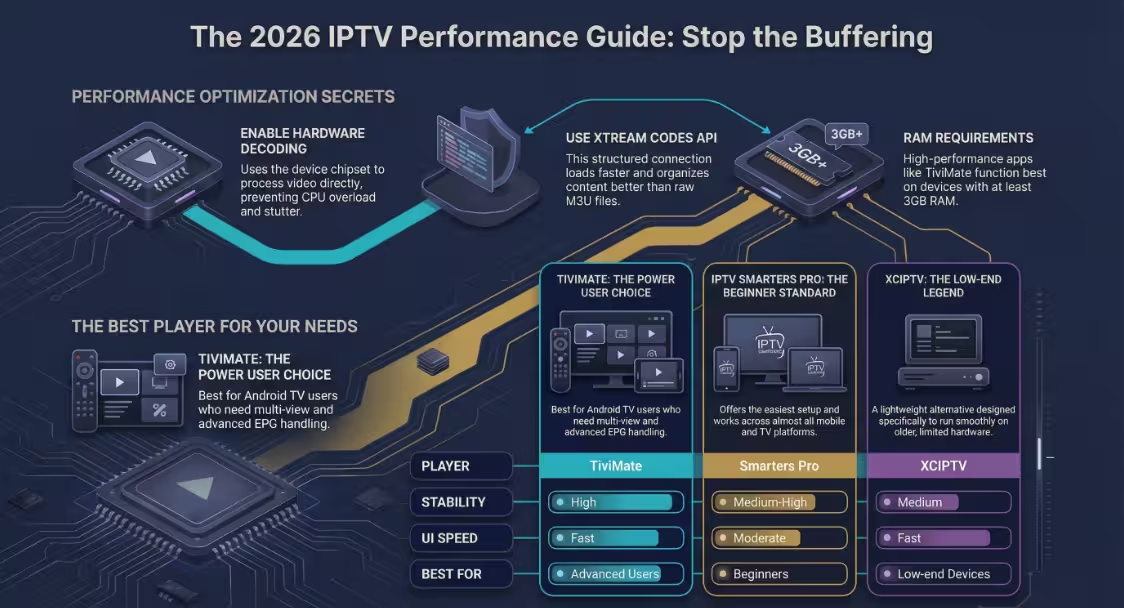
Choosing the right IPTV player depends on how you actually use your service rather than which app has the most features. If you are new to IPTV and want a quick setup without dealing with technical settings, IPTV Smarters Pro is the easiest starting point. It works across multiple devices and handles standard playlists without requiring configuration. If your priority is performance, especially for live sports or large channel lists, TiviMate is the better option. It uses system resources more efficiently and performs well on devices with higher RAM.
For users who want control over layout, filtering, and playlist management, OTT Navigator offers deeper customization than most players. On the other hand, if you are using a low-end device or an older streaming stick, XCIPTV is a safer choice because it runs with fewer resources and avoids lag. The best approach is to match the player with your device capability and viewing habits rather than choosing based on popularity alone.
Common Mistakes When Choosing an IPTV Player
Many users experience buffering or slow navigation because of incorrect player choices or poor configuration. One common mistake is using the wrong decoder setting. If the player is set to software decoding instead of hardware decoding, the device’s CPU handles video processing, which often leads to stutter during high-quality streams. Another issue is overloading the EPG with large datasets. Loading thousands of channels with full program data can slow down even good apps, especially on devices with limited RAM.
Choosing a heavy app on a low-spec device is another frequent problem. Apps like TiviMate perform best on devices with more memory, but may struggle on entry-level hardware. Ignoring playlist format also causes performance issues. M3U playlists require more processing, while Xtream Codes API connections are faster and more structured. These small decisions directly affect how smoothly your IPTV service runs.
Best Settings for Smooth IPTV Streaming
Even the best IPTV player can perform poorly if it is not configured correctly. The first setting to check is the decoder. Always set the player to hardware decoding, which allows the device’s chipset to process video efficiently and reduces strain on the CPU. Buffer size also plays a role. Increasing buffer slightly can help stabilize playback during minor network drops, but setting it too high may delay channel switching.
Using Xtream Codes API instead of M3U playlists improves loading speed and organization. It allows the player to separate live TV, movies, and series automatically. EPG settings should also be adjusted. Limiting the guide to relevant categories or a shorter time range reduces memory usage and improves responsiveness. These adjustments may seem minor, but together they make a noticeable difference in playback stability.
Does Your Device Affect IPTV Player Performance?
The performance of any IPTV player is closely tied to the device it runs on. A well-optimized app can still struggle if the hardware lacks sufficient RAM or processing power. Devices with 2GB RAM can handle basic playback, but may slow down when loading large playlists or switching between live TV and VOD sections. Higher-end devices with 3GB or 4GB RAM provide smoother navigation and better multitasking.
Network capability also matters. Devices with stable Wi-Fi or Ethernet connections reduce interruptions during streaming. For a deeper breakdown of how hardware impacts IPTV performance, including recommended devices for different setups, refer to your IPTV box guide. If you still experience issues, following a structured IPTV Troubleshooting approach can help identify whether the problem is related to your device, network, or player. Understanding this relationship helps avoid blaming the player when the actual limitation comes from the device itself.
Are IPTV Players Legal and Safe?
IPTV players themselves are legal applications. They function as media players that allow users to load playlists or stream content from external sources. Apps like VLC media player and IPTV Smarters are widely available on official app stores, which confirms their legitimacy as software tools. However, the legality of IPTV depends on the source of the content being streamed.
According to the Federal Communications Commission, distributing or accessing copyrighted content without proper authorization may violate regulations. This means the responsibility lies with the user to ensure that the service they are using complies with local laws. From a safety perspective, downloading apps from trusted sources such as official app stores reduces the risk of malware or modified versions.
FAQs
Which IPTV player is best for Firestick?
For Firestick devices, IPTV Smarters Pro works well due to its compatibility and ease of use. TiviMate is also a strong option if you are comfortable installing apps and want better performance.
Which IPTV player is best for Android TV?
TiviMate is widely preferred on Android TV because it offers better control, faster navigation, and strong handling of large playlists and EPG data.
Which IPTV player has the least buffering?
Buffering depends on multiple factors, but players that use hardware decoding efficiently, such as TiviMate and OTT Navigator, generally provide smoother playback when configured correctly.
Are free IPTV players good enough?
Free versions of apps like IPTV Smarters or XCIPTV are sufficient for basic use. Paid versions often unlock features such as multi-screen viewing, recording, and advanced customization.
Final Recommendation
If you want the best overall performance and control, TiviMate is the strongest option, especially on capable devices. For users who prefer a simple setup and broad compatibility, IPTV Smarters Pro remains the easiest choice. If customization and advanced controls matter more, OTT Navigator offers the most flexibility. The right player depends on your device, your usage, and how much control you want over your viewing experience.