
Your IPTV subscription quality only matters as far as your hardware can handle it. A premium service sending a 4K HEVC stream at 25 Mbps does nothing useful if the device receiving it falls back to software decoding, runs out of RAM mid-EPG load, or connects via a congested 2.4GHz Wi-Fi channel. The device you choose determines whether that stream plays flawlessly or buffers every time kick-off begins.
This guide covers five hardware options across different price points, explains the technical reasons behind each recommendation, and tells you exactly which scenarios call for which device, including the one question nobody answers: do you even need a dedicated box at all?
Why Your Hardware Is the First Variable to Fix
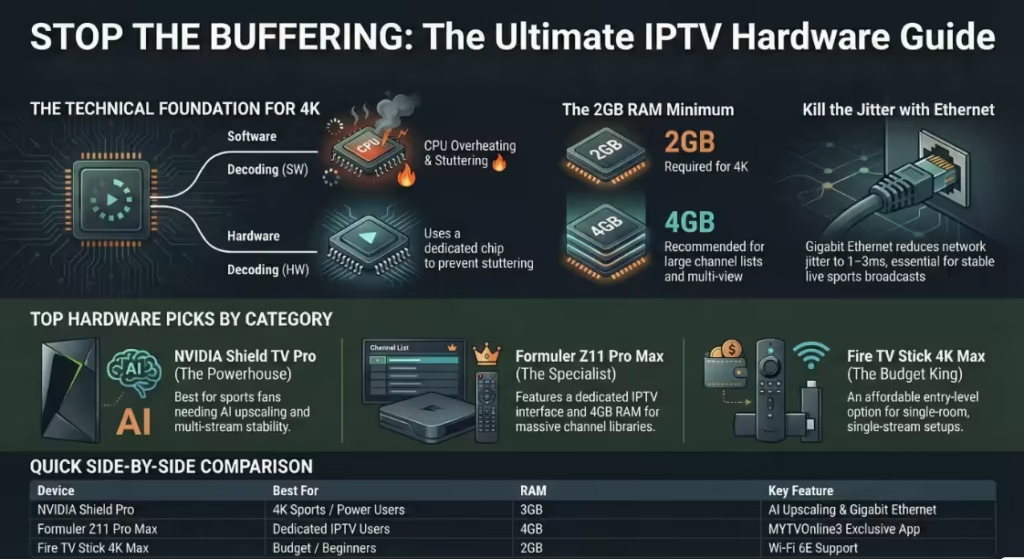
Before comparing devices, one technical concept determines almost every real-world IPTV experience: hardware decoding vs. software decoding.
When your device receives a compressed video stream, typically H.265/HEVC for 4K content, it must decompose that data into a viewable image. It can do this two ways:
- Hardware decoding (HW): The physical video decoder chip built into the SoC handles the process. It is fast, energy-efficient, and does not consume CPU or RAM headroom.
- Software decoding (SW): The app uses the device’s CPU to decode the video in real-time. On lower-end devices, this exhausts available CPU capacity, causes the processor to overheat, and produces the exact “micro-stutter loop” that users incorrectly blame on their IPTV provider.
A 4K HEVC stream at 60 fps requires sustained decoding of roughly 25–50 Mbps of compressed data. Any device without a dedicated hardware HEVC decoder will struggle under that load. This is the technical explanation behind frozen frames, audio playing over a static image, or video that rewinds three seconds every few minutes, all documented failure modes in IPTV player settings when the decoder is set to “Software” or “Built-in” instead of “Hardware.”
Minimum specs for stable 4K IPTV streaming:
- 2GB RAM (4GB recommended for TiviMate with large EPG + multi-playlist)
- Hardware H.265/HEVC decoder (not just software support)
- Wi-Fi 5 (802.11ac) minimum, Wi-Fi 6 or 6E preferred for peak-hour stability
- Gigabit Ethernet port or adapter for live sports
Best IPTV Box by Category: Quick Comparison (2026)
| Device | Price | RAM | 4K HEVC HW Decode | Wi-Fi | Best IPTV App | Best For |
| Fire TV Stick 4K Max (2nd Gen) | £70 / $60 | 2GB | ✅ Yes (AV1 + HEVC) | Wi-Fi 6E | IPTV Smarters Pro | Budget / beginners |
| NVIDIA Shield TV Pro | £199 / $199 | 3GB | ✅ Yes | AC dual-band + Gigabit Ethernet | TiviMate | 4K sports / power users |
| Formuler Z11 Pro Max | ~£109 / ~$119 | 4GB | ✅ Yes (AV1 + HEVC) | Wi-Fi 6 + Gigabit Ethernet | MYTVOnline3 (built-in) | Dedicated IPTV users |
| MAG 522w3 (Infomir) | ~£70 / ~$80 | 1GB | ✅ Yes (HEVC) | Dual-band Wi-Fi + 100Mbps Ethernet | Built-in portal | Portal/MAC-based setups |
| Fire TV Cube (3rd Gen) | £140 / $140 | 2GB | ✅ Yes | Wi-Fi 6E + Gigabit Ethernet | TiviMate / Smarters | Ethernet + voice control |
Device 1: Amazon Fire TV Stick 4K Max (2nd Gen), Best Entry-Level IPTV Stick
Specs (verified via Amazon and Tom’s Guide):
- Processor: MediaTek quad-core 2.0GHz
- RAM: 2GB
- Storage: 16GB
- Wireless: Wi-Fi 6E (tri-band, 6GHz capable)
- Video output: 4K @ 60fps, Dolby Vision, HDR10+, HLG
- Audio: Dolby Atmos, Dolby Digital Plus
- Price: £70 / $59.99
The 2nd Gen 4K Max introduced Wi-Fi 6E, the first Amazon stick to support the 6GHz band. In practical IPTV terms, what this means is access to a less congested radio frequency. In a household where a 2.4GHz or 5GHz band is shared across laptops, phones, and smart home devices, IPTV streams on the 6GHz band avoid competing for bandwidth during peak hours.
That said, you need a Wi-Fi 6E router to access the 6GHz band. Without one, the stick falls back to 5GHz, still adequate, but no different from the 1st Gen.
The RAM ceiling is its real-world limitation. At 2GB with a 32-bit architecture (confirmed by multiple hardware reviewers), the stick cannot address more than 2GB regardless of OS updates. Running TiviMate with a large Xtream Codes library, a full 7-day EPG, and a multi-stream playlist pushes this device to its limit. You will notice app sluggishness when switching between Live TV and VOD sections on services with 20,000+ channel lists.
For IPTV use, the critical setting: Once IPTV Smarters Pro or TiviMate is installed, navigate to Settings → Player Selection and switch “Live TV” from Built-in to Hardware Decoder. This offloads video processing to the MediaTek chip and removes the software decoding CPU strain entirely. Without this change, 4K streams will stutter even on this device. See our IPTV Apps Guide for the full player configuration walkthrough.
Verdict: Ideal for one-room single-stream setups where budget is the deciding factor. Not suitable for multi-room plans or IPTV services where EPG loads exceed 10,000 entries.
Device 2: NVIDIA Shield TV Pro, Best for 4K Sports Streaming
Specs (verified via NVIDIA’s official product page and AnandTech):
- Processor: NVIDIA Tegra X1+, 25% faster than the original X1
- GPU: 256-core NVIDIA Maxwell GPU
- RAM: 3GB
- Storage: 16GB (expandable via 2× USB 3.0)
- Wireless: 802.11ac dual-band + Gigabit Ethernet
- Video: 4K HDR @ 60fps (H.265/HEVC, VP8, VP9, H.264)
- Audio: Dolby Atmos, Dolby Digital Plus, Dolby Vision
- Price: $199.99 / ~£179
The Shield TV Pro remains the strongest Android TV streaming device available without moving into the ARM64 Android 13 box category. Its Tegra X1+ processor includes NVIDIA’s proprietary AI upscaling engine, when receiving a 1080p feed from an IPTV service, the Shield’s processor reconstructs a near-4K image in real-time using machine learning. On a 55-inch or larger OLED display, this is visually meaningful for sports broadcasts that are transmitted in 1080i rather than native 4K.
The 3GB RAM allocation gives TiviMate the headroom it needs for its most demanding features: 9-screen multi-view mode (watching multiple simultaneous live sports streams on one display), real-time EPG updates, and SMB network recording to an attached USB drive or home NAS server. On a 2GB device, activating 4-way multi-view forces the app to drop stream quality or crash the session entirely.
The Gigabit Ethernet port is the Shield’s most underrated IPTV feature. A wired Gigabit connection eliminates the single biggest variable in IPTV stability: Wi-Fi jitter. Network jitter, variation in packet delivery timing, above 30ms causes micro-stutter on 4K streams regardless of your overall download speed. An Ethernet connection to your router reduces jitter to 1–3ms consistently. For live sports where a 10-second delay already exists between the broadcast source and your device, removing additional jitter from the equation is the only way to guarantee the stream does not pause mid-penalty.
For IPTV use: TiviMate is the recommended app. Set playlist integration to Xtream Codes API (not M3U) so the Shield can auto-categorize live channels, VOD, and series separately. Enable “Update on App Start” for EPG under Settings → TV Guide. Full setup instructions are in our Installation Guide.
Verdict: The correct device for serious sports viewers, households running multi-stream subscriptions, or anyone who wants to use IPTV alongside Plex, Emby, or local network media.
Device 3: Formuler Z11 Pro Max, Best Dedicated IPTV Box
Specs (verified via Formuler’s official product page and TroyPoint review):
- Processor: RealTek RTD1319C
- GPU: Mali-G57 MC1
- RAM: 4GB DDR4 @ 2400MHz
- Storage: 32GB eMMC
- Wireless: Wi-Fi 6 (AX 2×2) + Gigabit LAN
- Video: 4K @ 60fps, AV1, H.265/HEVC, H.264
- OS: Android 11
- Pre-installed: MYTVOnline3 (Formuler’s exclusive IPTV platform)
- Price: ~$119 / ~£109
The Formuler Z11 Pro Max is the only device in this list specifically engineered for IPTV, not general Android TV use, not gaming, not voice assistants. Every hardware and software decision reflects that focus.
The 4GB RAM is its defining advantage over the Fire TV lineup. With 4GB, MYTVOnline3 or TiviMate can simultaneously hold a full channel list (20,000+ entries), a populated 7-day EPG, and an active VOD library index without triggering memory compression. On 2GB devices, this combination forces the OS to swap data to storage, which causes the familiar “EPG not loading” symptom, not a server issue, but a RAM exhaustion issue.
MYTVOnline3, pre-installed and exclusive to Formuler devices, handles Xtream Codes API and M3U playlist integration natively. It supports multi-source management (running two separate IPTV subscriptions simultaneously on one screen), custom channel group pinning, parental lock per category, and a picture-in-picture mode for two simultaneous live streams. These features cannot be sideloaded onto other devices; MYTVOnline3 is hardware-locked to Formuler boxes.
One important limitation: The Formuler Z11 Pro Max is not Netflix certified. Widevine DRM is at Level 1 (confirmed on the product page), which does handle DRM-protected OTT content, but the official Netflix app is not available from the Google Play Store on this device. If you rely on Netflix alongside IPTV, the Shield TV Pro or Fire TV Stick is more practical.
For IPTV use: Use the Xtream Codes API login within MYTVOnline3 for best results. For Gigabit Ethernet setup on this device, refer to our device-specific Installation Guide.
Verdict: The correct choice if IPTV is the primary use case and you want the most RAM, the cleanest IPTV-specific interface, and native Gigabit Ethernet without paying Shield TV Pro pricing.
Device 4: Infomir MAG 522w3, Best for Portal/MAC-Based Setups
Specs (verified via Infomir’s official product page):
- Chipset: Amlogic S905X2, quad-core ARM Cortex-A53
- RAM: 1GB
- Storage: 4GB eMMC
- Wireless: Dual-band Wi-Fi (2.4GHz + 5GHz) + 100Mbps Ethernet
- Video: 4K @ 60fps, H.265/HEVC, HDR
- OS: Linux 4.9
- Price: ~£70–£80 / ~$80–$90
MAG boxes operate differently from every other device on this list. Rather than installing an IPTV player app, the MAG 522w3 uses a portal-based system: you enter a portal URL into the device’s settings and it connects directly to your IPTV provider’s server using your device’s MAC address as the authentication token. There are no APKs to sideload, no Xtream Codes credentials to type, and no app updates to manage.
This approach has one significant advantage and one significant constraint. The advantage: the Linux OS is locked, lean, and cannot be loaded with background processes competing for RAM. According to Infomir’s documentation, the MAG 522w3 can run for several months without requiring a reboot, a stability characteristic that Android-based boxes do not match. The constraint: 4K content requires H.265/HEVC codec support from your IPTV provider, and the 100Mbps Ethernet port (not Gigabit) means very high-bitrate 4K HDR streams near the 100Mbps ceiling could theoretically saturate the connection. In practice, well-encoded 4K HEVC at 25Mbps sits well within this limit, but it is worth noting compared to Gigabit-capable alternatives.
Who this device is for: Users whose IPTV provider specifically recommends MAC-based portal authentication, users migrating from older MAG 324 or 424 boxes, and users who want a plug-and-play device with no Android complexity to manage. It is not the right choice if you want to install TiviMate, run multiple simultaneous streams, or use the device for anything beyond IPTV playback.
For MAG box setup, including portal URL entry and how to locate your MAC address for provider registration, see our step-by-step Installation Guide for MAG Devices.
Do You Actually Need a Dedicated IPTV Box?
This is the question every buyer should answer before purchasing hardware. Three scenarios, three honest answers:
Your Smart TV is enough if:
- It runs Samsung Tizen (2020 or later) or LG WebOS 6.0 (2021 or later)
- You are connecting via Ethernet or a stable 5GHz Wi-Fi signal
- You plan to use IBO Player Pro or Flix IPTV, both available directly from the Samsung App Store and LG Content Store
- You run a single-stream subscription on one TV
The limitation: Smart TVs have restricted internal storage (typically 4–8GB across all apps) and limited RAM allocation per app. EPG data for 20,000+ channels pushes Smart TV apps toward memory pressure and crash loops. A “Lite” EPG feed, covering only your preferred country and sports categories, resolves this. Our IPTV Apps Guide covers Smart TV app setup in detail, including the one-time MAC address activation workflow that IBO Player requires.
A streaming stick beats a full box if:
- You are setting up a single secondary TV (bedroom, kitchen)
- Budget is under £75
- You do not need multi-view or PVR/recording features
- The room has solid Wi-Fi 5 or better coverage
The Fire TV Stick 4K Max handles these scenarios well. Its 2GB RAM constraint does not become a problem in single-stream, single-playlist use.
Only a full Android box will do if:
- You run a multi-stream family subscription (3 simultaneous connections)
- You use TiviMate’s multi-view feature for live sports
- You want PVR recording to a USB drive or NAS
- Your EPG covers multiple countries and exceeds 10,000 entries
- You want TiviMate Premium’s SMB network recording
In this case, the Formuler Z11 Pro Max (4GB RAM, Gigabit Ethernet) or the NVIDIA Shield TV Pro (3GB RAM, Gigabit Ethernet, AI upscaling) are the only sensible choices.
How UK ISP Interference Affects Device Choice
UK ISPs including BT, Sky, Virgin Media, and TalkTalk have all been subject to High Court blocking orders targeting IPTV services. Sky obtained an extended blocking injunction in November 2024, covering BT, EE, Plusnet, TalkTalk, and Virgin Media, which applies IP address blocking, DNS blocking, and Deep Packet Inspection (DPI) across their networks, as documented by TorrentFreak’s December 2024 coverage of the order.
DPI is the mechanism most relevant to device choice. BT’s blocking implementation uses Cleanfeed, applying IP address blocking, IP address re-routing at the core network level, and Deep Packet Inspection-based blocking on both fixed-line and mobile networks.
What this means practically: a device connected via Wi-Fi, where the stream travels through your router using your ISP’s DNS, is fully visible to DPI filtering. A device connected via Ethernet, using a manually configured DNS (Cloudflare’s 1.1.1.1 or Google’s 8.8.8.8) bypasses the DNS-blocking layer. This does not circumvent IP-level blocks, but it removes one of the three blocking mechanisms your ISP uses simultaneously.
Most throttling in the UK happens during peak hours between 6 PM and 11 PM, exactly when Premier League kick-offs, Champions League matches, and PPV events are scheduled. Devices with Gigabit Ethernet ports (Shield TV Pro, Formuler Z11 Pro Max, Fire TV Cube 3rd Gen) give you the option of bypassing Wi-Fi entirely. For the Fire TV Stick, Amazon’s official Ethernet Adapter (using a Micro-USB connection, not USB-C) enables a wired connection, though it is limited to 100Mbps Fast Ethernet rather than Gigabit.
For the complete DNS override procedure and the mobile data isolation test for diagnosing ISP blocking, see our IPTV Troubleshooting Guide.
Total Cost: Device + Subscription vs. Cable TV
| Setup | Year 1 Cost | Year 2+ Cost |
| Formuler Z11 Pro Max + 12-month IPTV subscription | ~£109 + £50 = ~£159 | £50/yr (subscription only) |
| NVIDIA Shield TV Pro + 12-month IPTV subscription | ~£179 + £50 = ~£229 | £50/yr |
| Fire TV Stick 4K Max + 12-month IPTV subscription | £70 + £50 = £120 | £50/yr |
| Sky TV (HD + Sky Sports + Sky Cinema) | £600–£900/yr minimum (18-month contract) | Same |
| Sky + Netflix + Disney+ | £900–£1,100/yr | Same |
Even at the top of this device list, an NVIDIA Shield TV Pro + 12-month IPTV subscription costs less in year one than two months of a full Sky Sports package. From year two, the device is already paid for and the subscription alone is the only recurring cost.
For a full breakdown of IPTV cost against cable and streaming service bundles, see our IPTV vs Cable comparison.
Common Mistakes When Choosing an IPTV Box
Most playback issues are not caused by the IPTV service itself but by poor device selection. One of the most common mistakes is buying low-cost Android boxes with unknown chipsets. These devices often advertise “4K support,” but lack proper hardware decoding, forcing the CPU to handle video processing and resulting in stutter under load. Another frequent issue is ignoring RAM limits. Devices with 2GB RAM may run a single stream without problems, but struggle when handling large channel lists, full EPG data, or multiple playlists. Users also tend to rely entirely on Wi-Fi, even in congested environments, which introduces instability that appears as buffering during live events. App compatibility is another overlooked factor. Not all devices support apps like TiviMate or IPTV Smarters equally well, especially portal-based systems such as MAG boxes that do not allow app installation at all. Finally, many users overestimate their needs and buy high-end hardware for simple setups, or do the opposite and choose entry-level devices for multi-room or multi-stream use, leading to avoidable performance issues.
Frequently Asked Questions
What is the minimum RAM for 4K IPTV streaming?
2GB is the absolute minimum for single-stream 4K. For services with channel lists above 10,000 entries, combined with a full EPG, 4GB is the practical requirement. Devices below 2GB will fall back to software decoding and produce visible stutter on HEVC streams.
Can I use a Smart TV instead of an IPTV box?
Yes, if your TV runs Tizen 2020+ or LG WebOS 6.0+ and you use a Lite EPG feed. For high-channel-count services or multi-stream use, a dedicated Android box provides better performance and stability than any built-in Smart TV OS.
Does an IPTV box work without a VPN?
On most connections, yes. Changing your device DNS to 1.1.1.1 (Cloudflare) or 8.8.8.8 (Google) removes the DNS-blocking layer used by UK ISPs. A VPN encrypts the traffic layer and prevents DPI identification, but it adds latency, use WireGuard protocol if VPN is necessary, as it has significantly lower overhead than OpenVPN for video streaming.
Which box works with both IPTV Smarters Pro and TiviMate?
Both apps run on Android-based devices. The Formuler Z11 Pro Max, NVIDIA Shield TV Pro, and Fire TV Stick 4K Max all support both apps via sideload or Google Play. The MAG 522w3 (Linux OS) does not support either app natively. For per-app configuration instructions on each device, see our IPTV Apps Guide.
Is the Firestick or Android box better for IPTV?
For a single-TV, single-stream setup: the Fire TV Stick 4K Max is sufficient and significantly cheaper. For multi-stream, high-channel-count, or PVR use cases: a dedicated Android box with 4GB RAM and Gigabit Ethernet is the correct choice. The Fire TV Stick’s 32-bit architecture and 2GB RAM ceiling are not limitations for basic use, but they become genuine constraints at scale.
Which device is best for watching live Premier League games on IPTV?
The NVIDIA Shield TV Pro or Formuler Z11 Pro Max connected via Gigabit Ethernet, running TiviMate on Xtream Codes API, with DNS set to 1.1.1.1. This combination removes Wi-Fi jitter, bypasses DNS-level ISP blocking, and uses hardware HEVC decoding throughout, the three factors most responsible for stream failure during peak sports broadcasts.
Ready to test your chosen device? Start with a free trial from our Priority Network to verify compatibility on your home connection before committing to a full subscription.