
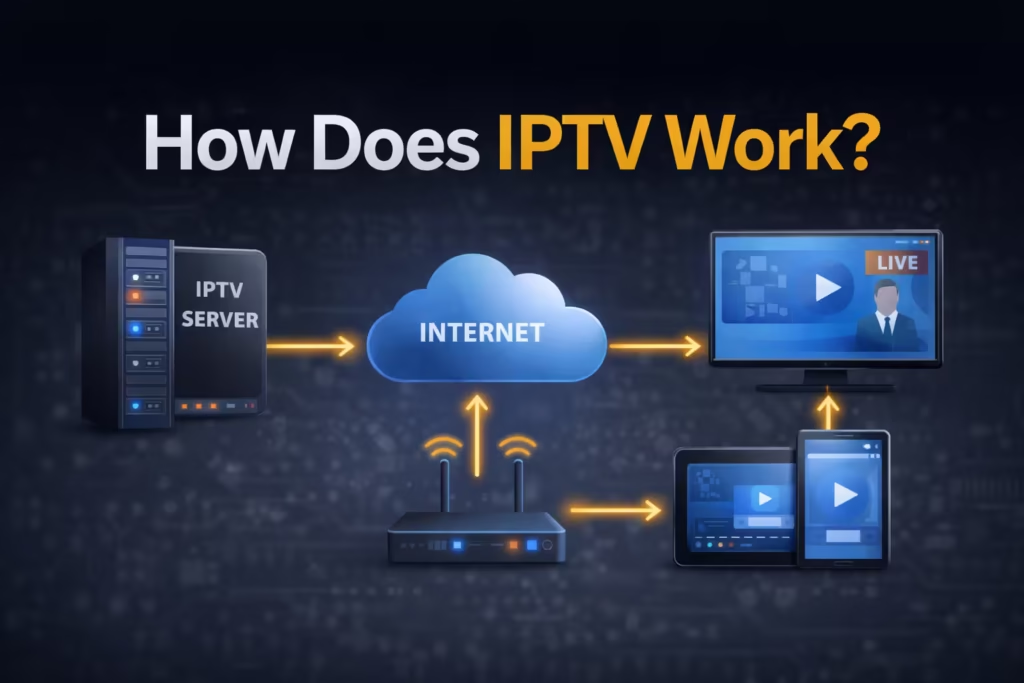
IPTV can seem confusing at first, especially if you are used to traditional cable or satellite TV. Many people assume it works the same way, but the delivery process is completely different. Instead of signals coming through cables or dishes, IPTV uses your internet connection to stream content directly to your device. The goal of this guide is to remove that confusion and explain how everything fits together. You will see how content moves from a source to your screen, step by step, and understand what actually affects performance, quality, and reliability during playback.
What Is IPTV? (Simple Definition First)
IPTV stands for Internet Protocol Television, which simply means watching TV content through an internet connection instead of traditional broadcast methods. Unlike cable or satellite systems that rely on fixed infrastructure, IPTV delivers video data using the same networks that power websites and online services. This allows users to access live channels, movies, and series on demand without being tied to a specific location or hardware setup.
The key difference is how the content is delivered. In traditional TV, channels are broadcast continuously, and you tune into them. With IPTV, content is requested and streamed when you select it. This makes it more flexible and allows features such as pause, rewind, and on-demand viewing. In simple terms, IPTV turns television into a data stream that your device can receive and play in real time.
How IPTV Works (Step-by-Step)
Understanding how IPTV works becomes easier when you break it down into stages. Each step plays a role in delivering video from a source to your screen, and problems at any stage can affect playback quality.
Content Source
Everything starts with the content itself. This includes live TV channels, recorded programs, and video libraries stored on media servers. Broadcasters or content providers supply these streams, which are then prepared for internet delivery. Live content is captured in real time, while movies and series are stored on servers ready to be accessed when requested. These sources act as the starting point before any processing or transmission happens.
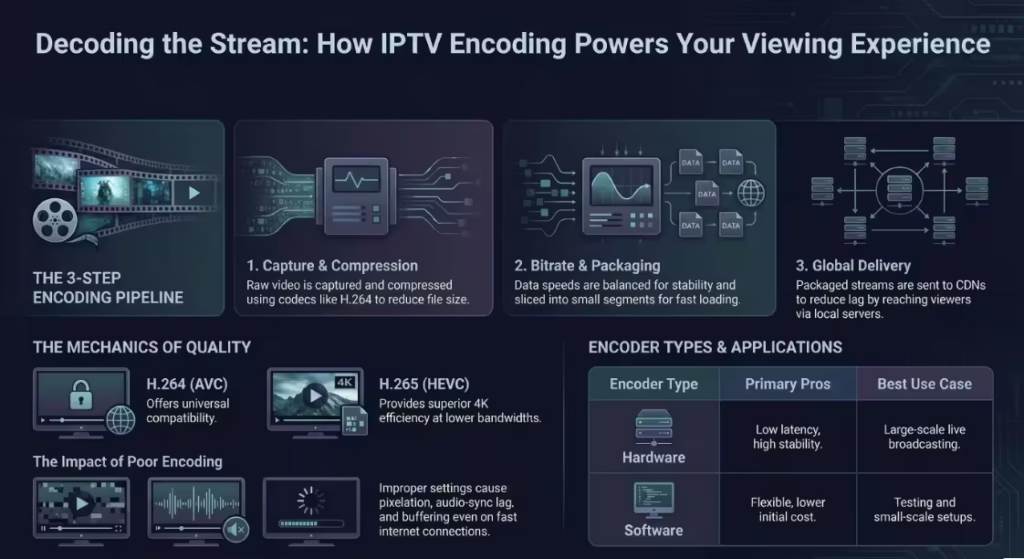
Encoding & Compression
Raw video files are too large to stream efficiently, so they must be compressed. This is done using codecs such as H.264 or H.265 (also known as HEVC). Compression reduces file size while maintaining visual quality, making it possible to stream content over standard internet connections. H.265 is more efficient than H.264, which is why it is commonly used for 4K streaming. Without this step, even fast internet connections would struggle to deliver smooth playback due to the sheer amount of data involved.
Streaming via Internet
Once the content is compressed, it is sent to streaming servers. These servers distribute the video using content delivery systems, often supported by global infrastructure providers like Cloudflare. Instead of sending data from a single location, the system uses multiple servers to deliver content closer to the user. This reduces delays and improves stability. The stream is broken into small data packets and sent continuously, allowing playback to begin almost instantly without waiting for the entire file to download.
Delivery to Your Device
After leaving the server, the stream travels through your internet service provider (ISP) to reach your device. This stage depends heavily on network quality. Factors such as connection speed, latency, and congestion can all affect how smoothly the data arrives. A stable connection ensures that video packets arrive in the correct order and on time. If the connection is unstable, packets may be delayed or lost, which leads to buffering or interruptions during playback.
Decoding & Playback
The final step happens on your device. The IPTV player receives the compressed data and converts it back into video and audio that you can watch. This process is called decoding. Devices with hardware decoding can handle this efficiently, while weaker devices may rely on software decoding, which uses more processing power and can cause stutter. The player also organizes channels, loads program guides, and manages playback controls. At this stage, both the device and the app determine how smooth the viewing experience feels.
Types of IPTV Services
IPTV is not limited to one type of content delivery. It generally falls into three main categories, each serving a different viewing need. Understanding these types helps clarify how flexible IPTV can be compared to traditional TV systems.
- Live TV: This works similarly to regular television, where channels are streamed in real time. You watch programs as they are broadcast, including sports events, news, and live shows.
- Video on Demand (VOD): This allows you to select and watch content whenever you want. Movies and series are stored on servers, and playback يبدأ instantly when selected.
- Time-shifted TV: This feature lets you replay or catch up on previously aired content. It includes options like pause, rewind, or watching a program after it has finished broadcasting.
Each type relies on the same underlying technology but differs in how content is accessed and delivered.
What Do You Need to Use IPTV?
Using IPTV does not require complex equipment, but a few key components must work together for a smooth experience. Each part plays a role in how well the IPTV service performs.
- Internet connection: A stable broadband connection is essential. For HD streaming, at least 10–15 Mbps is recommended, while 4K content may require 25 Mbps or more.
- Device: This can be a Smart TV, streaming stick, Android box, smartphone, or computer. The device’s processing power affects playback quality.
- IPTV player: An application that loads and plays the streams. Different players handle performance differently, which directly impacts stability.
- Subscription or source: This provides access to channels or content. The quality of this source affects stream reliability and availability.
When all these elements are properly aligned, IPTV delivers a smooth and flexible viewing experience that adapts to your preferences and setup.
Why IPTV Buffers (Real Explanation)
Buffering is one of the most common complaints with IPTV, but it rarely has a single cause. In most cases, it is the result of multiple factors working together. The first factor is internet instability, not just speed. Even a fast connection can struggle if there is high latency or packet loss, which interrupts the steady flow of video data. This is why users sometimes experience buffering during peak hours when networks are congested.
Device limitations also play a major role. A device with low RAM or a weak processor may fail to decode video efficiently, especially for 4K streams. This leads to stutter or delays even if the internet connection is stable. Player settings are another overlooked factor. If the app is set to software decoding instead of hardware decoding, it puts unnecessary strain on the device. Lastly, server load affects performance. If too many users access the same stream at once, the server may slow down or fail to deliver data consistently. In simple terms, buffering is usually a combination of network quality, device capability, app configuration, and server performance.
IPTV vs Traditional TV (Cable/Satellite)
IPTV and traditional TV systems deliver content in very different ways, which affects flexibility, cost, and user control. The table below highlights the key differences in a simple format.
| Feature | IPTV | Cable / Satellite TV |
| Delivery Method | Internet-based streaming | Broadcast via cable or satellite |
| Flexibility | Watch on multiple devices anywhere | Limited to fixed location |
| Content Access | On-demand + live TV | Mostly scheduled programming |
| Installation | No dish or cable required | Requires physical setup |
| Cost | Typically lower and flexible plans | Higher, often long-term contracts |
| Features | Pause, rewind, multi-device support | Limited interactive features |
The main advantage of IPTV is flexibility. Users can watch content on different devices and access on-demand libraries instantly. Traditional TV, on the other hand, follows a fixed broadcast model with less control over when and how content is viewed.
Is IPTV Legal and Safe?
IPTV as a technology is completely legal. It is simply a method of delivering television content over the internet, and many legitimate services use this model. Applications and devices used for IPTV are also legal, as they function like standard media players. However, the legality depends on the source of the content being streamed.
According to organizations such as the Federal Communications Commission and the European Commission, accessing or distributing copyrighted material without proper authorization may violate laws. This means users are responsible for ensuring that the service they use complies with regulations in their region. From a safety perspective, using trusted IPTV apps and avoiding modified or unofficial software reduces risks such as malware or data exposure. The key point is that IPTV itself is legal, but the content source determines whether usage is compliant.
Common Misconceptions About IPTV
There are several misunderstandings about IPTV that often lead to confusion or incorrect expectations. One common belief is that IPTV is always illegal. In reality, many licensed platforms use IPTV technology to deliver content legally. The issue is not the technology, but how it is used.
Another misconception is that all IPTV services perform the same. In practice, quality varies widely depending on server infrastructure, stream optimization, and user setup. Two services may offer similar content but deliver very different viewing experiences. A third misunderstanding is that internet speed is the only factor that matters. While speed is important, other elements such as device performance, player configuration, and network stability have an equal impact. These misconceptions often cause users to misdiagnose problems and overlook the real causes of poor performance.
How to Get Started with IPTV
Starting with IPTV does not require a complicated setup, but making the right choices early can prevent many common issues. The first step is selecting a suitable device. This could be a Smart TV, streaming stick, or Android box, depending on your needs and budget. The device should have enough processing power to handle your expected usage, especially if you plan to watch high-resolution content.
Next, choose an IPTV player that matches your experience level. Some apps are easier to set up, while others offer more control and better performance. After that, select a service or source and test it before committing long-term. Many users benefit from trying a short-term plan to check compatibility with their device and network. If any issues appear during testing, following basic IPTV Troubleshooting steps can help identify whether the problem is related to the app, device, or connection. This approach ensures your setup works smoothly in your specific environment before making a long-term decision.
FAQs
Is IPTV free?
IPTV can be free or paid depending on the source. Free options exist, but they often come with limitations such as lower quality, fewer channels, or unstable streams. Paid services usually provide better reliability and support.
How much internet speed is needed for IPTV?
For standard HD streaming, around 10–15 Mbps is usually enough. For 4K content, a stable connection of at least 25 Mbps is recommended to avoid buffering.
Do you need a special box for IPTV?
No, IPTV can run on many devices including Smart TVs, smartphones, and computers. However, dedicated streaming devices or Android boxes often provide better performance and smoother playback.
Why does IPTV lag or buffer?
Lag can be caused by several factors, including unstable internet, device limitations, incorrect player settings, or high server load. Identifying the exact cause helps improve performance.
Final Thoughts
IPTV works by delivering television content through internet networks instead of traditional broadcast systems, giving users more flexibility and control over how they watch. Once you understand how content moves from servers to your screen, it becomes easier to identify what affects performance and how to improve it. Choosing the right device, player, and service makes a noticeable difference in stability and quality. By focusing on these factors and avoiding common mistakes, you can create a setup that runs smoothly and fits your viewing needs without unnecessary interruptions. To test real performance before committing, you can get free IPTV trial access and evaluate quality, speed, and reliability based on your own setup.